GitNexus Deep Dive: The Knowledge Graph for AI Coding Agents
How GitNexus gives AI coding agents real codebase awareness - the indexing pipeline, Leiden clustering, hybrid BM25+RRF search, and when to use it.
GitNexus Deep Dive: The Knowledge Graph for AI Coding Agents
With the rise of Vibe coding, we have seen many people delivering unserious apps within hours or even minutes. Although, these are good for hobby, but when you’re dealing with real customer data on a serious production environment things can go south without proper supervisation of the AI generated code.
Now, I am not here to make big claims of how sh*t AI agents are in coding. Cause, they are not; When you give them the right context, they can give you something a senior engineer can produce but faster. The word context is quite the key here. Modern LLMs are extraordinarily good at reasoning about code they can see. The hard constraint is what gets into their context window in the first place - and for any codebase beyond a few hundred files, that context is necessarily a thin, incomplete slice of reality.
GitNexus is built around a specific thesis. Precompute the complete structural map of a codebase - every dependency, call chain, community cluster, and execution flow - and expose it through MCP. AI agents stop guessing and start navigating with precision. This post examines how that thesis gets implemented, what algorithms sit underneath it, where the approach works well, and how to get the best out of it.
Table of Contents
- GitNexus Deep Dive: The Knowledge Graph for AI Coding Agents
- Table of Contents
- The Structural Awareness Gap
- What GitNexus Actually Is
- How GitNexus Builds the Map
- The MCP Tools: What Your Agent Actually Gets
- Traditional Graph RAG vs Precomputed Relational Intelligence
- When to Use GitNexus (and When to Skip It)
- Tips for Getting the Best Out of It
- Closing Thoughts
The Structural Awareness Gap
The problem is well-understood in static analysis circles but underappreciated in the AI tooling space. When an AI agent receives a task like “rename validateUser to verifyUser”, the agent’s default behaviour is to search for the symbol, find its definition, and make the change. If it is a well-prompted agent, it might also grep for call sites in the immediate vicinity.
What it almost never does is ask: which processes does this function participate in? Which community of related functions does it belong to? How many upstream callers depend on its current return type, and across which files?
Those questions require a precomputed structural model of the codebase - the kind a compiler or sophisticated IDE maintains internally. No current AI agent builds that model dynamically in a way that generalises to arbitrary codebases at query time. GitNexus fills exactly that gap. The design choices are non-trivial and worth understanding.
What GitNexus Actually Is
GitNexus is a CLI tool, an MCP server, and a browser-based graph explorer. The core offering is an offline indexing pipeline that runs against your repository and builds a knowledge graph into an embedded LadybugDB instance stored locally in .gitnexus/. Once indexed, a single MCP server process (started via npx gitnexus mcp) serves all your indexed repositories to any connected AI agent - 16 tools, several resources, and 2 guided prompts.
The critical architectural insight is that the structural analysis happens at index time, not at query time. By the time your agent asks “what is the blast radius of this change?”, the answer has already been computed. The query is a lookup against a precomputed graph, not a fresh traversal that could miss edges or time out on large repos.
This is what separates GitNexus from approaches that ask the LLM itself to reason over raw graph edges. The LLM cannot guarantee it explores enough of the graph to catch every dependency. GitNexus precomputes the full closure and hands the agent a structured, confidence-scored answer.
How GitNexus Builds the Map
Running gitnexus analyze kicks off a 12-phase pipeline that walks your repo and produces a knowledge graph stored locally in .gitnexus/. You do not need to understand every phase. But three capabilities that come out of it are worth knowing - they are what makes the MCP tools actually useful rather than just fancy grep.
Parsing across 14 languages with a single graph schema. GitNexus uses Tree-sitter for parsing, which matters for two reasons. First, it is error-tolerant - it produces a partial parse tree even for broken or mid-edit code, so an incomplete file does not break the index. Second, all 14 supported languages feed into the same set of graph node types (Function, Class, Method, CALLS, IMPORTS, EXTENDS). A TypeScript service and a Python worker end up in the same graph, connected by the same edge vocabulary. That uniformity is what makes cross-file and cross-repo impact analysis work regardless of which language a dependency lives in.
Symbol clustering via the Leiden algorithm. After parsing, GitNexus groups related symbols into functional communities using Leiden. Unlike its predecessor Louvain - where up to 16% of communities can be disconnected in practice - Leiden guarantees every community is internally connected. These clusters become the architectural vocabulary for everything else. When impact tells you a change affects 3 clusters, those are real functional groupings - AuthenticationLayer, PaymentProcessing, whatever the dominant symbols suggest. The community cohesion scores exposed via gitnexus://repo/{name}/clusters are also worth checking: a cluster that should be tightly coupled but scores low is usually a sign of architectural drift.
Hybrid search that understands intent, not just text. The query tool combines BM25 (exact keyword matching, strong for symbol names and file paths) with semantic vector search using Snowflake’s arctic-embed-xs embeddings, merged via Reciprocal Rank Fusion. In practice this means a query for “authentication middleware” surfaces JWTValidator even if those words appear nowhere in the function name, because the embedding space places them close together. Results are also grouped by process context - not a flat list of matches, but a structured view of which execution flow each result belongs to.
The MCP Tools: What Your Agent Actually Gets
Once indexed, the MCP server exposes 16 tools. The four most architecturally interesting ones:
impact - Blast radius analysis with depth grouping and confidence scoring. Given a target symbol and a direction (upstream or downstream), it returns a structured breakdown of everything affected, grouped by distance and confidence. minConfidence: 0.8 filters to edges the system is highly confident about. This is the tool you reach for before any non-trivial refactor.
context - 360-degree view of a single symbol: all callers, all callees, all processes it participates in, and which step it occupies in each process. This is the tool you reach for when you are trying to understand what a function does without reading all of its consumers.
query - Process-grouped hybrid search. The response is structured not as a flat list of matches but as a set of process contexts, each containing the relevant symbols and their positions in the execution flow. This is richer than a grep - it tells you not just where a term appears but what workflow it participates in.
detect_changes - Maps a git diff to affected symbols and processes with a risk level assessment. Run this before committing to understand your actual blast radius rather than guessing. Here’s an example of impact analysis I did on one of my codebases:
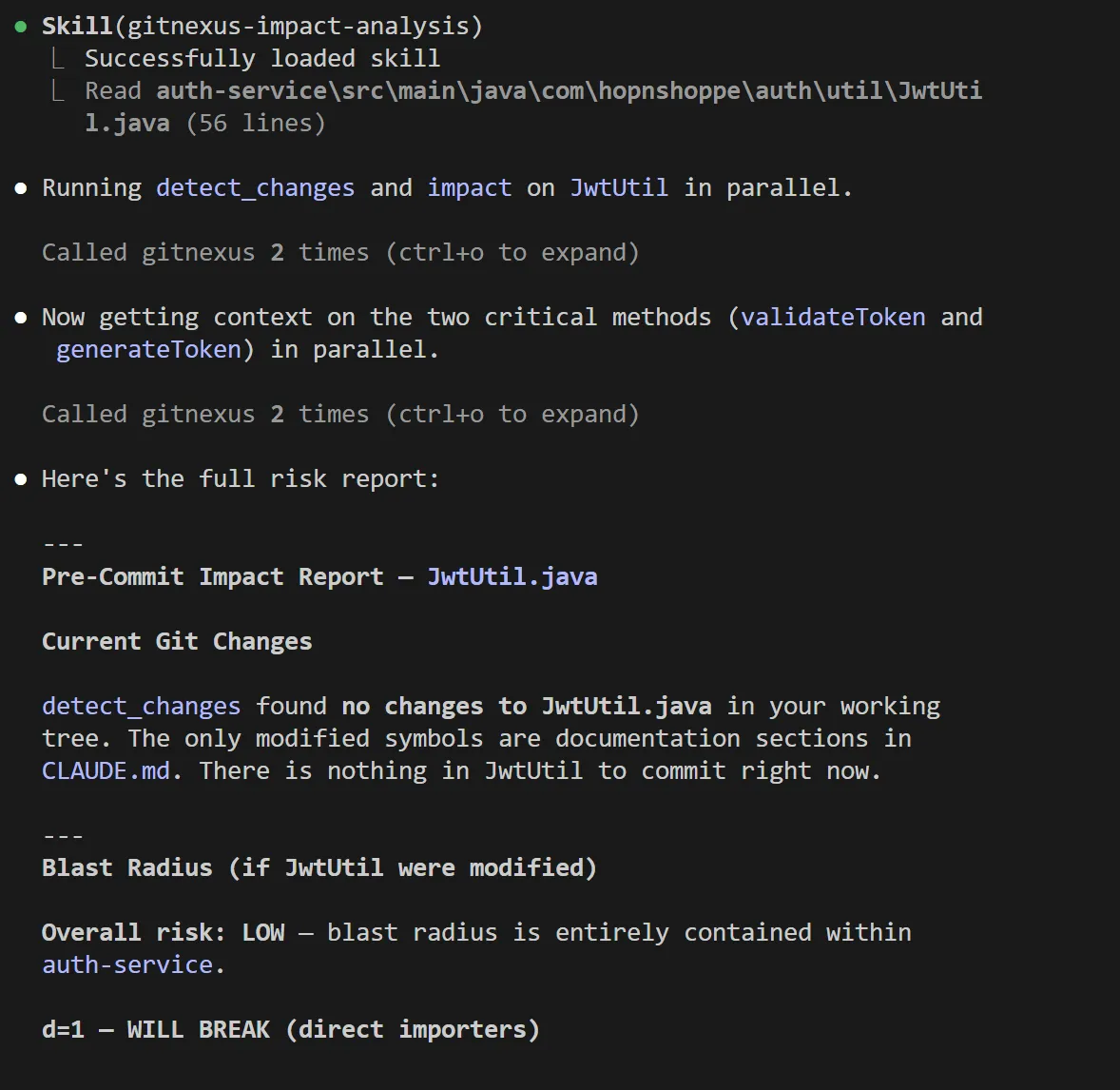
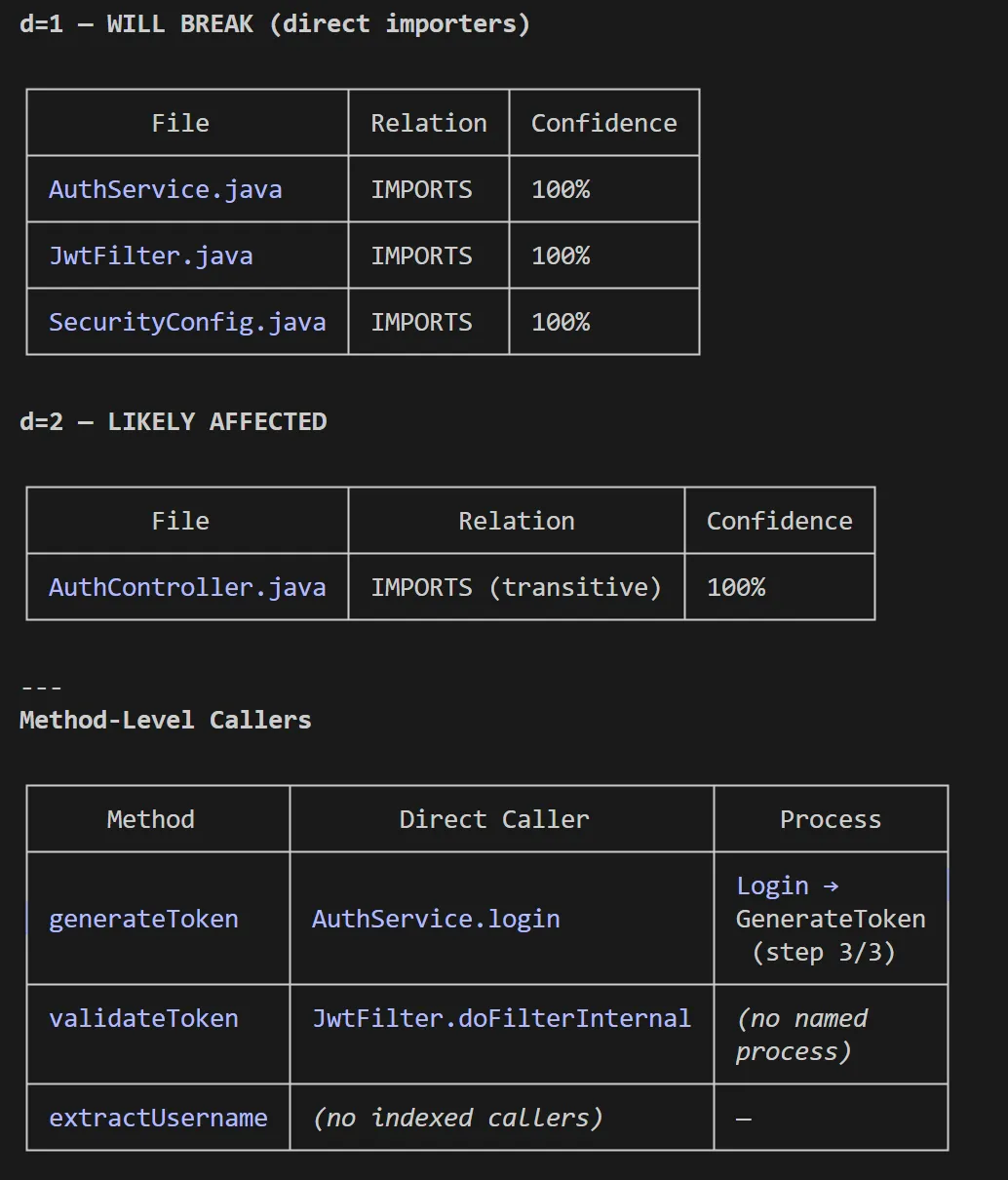
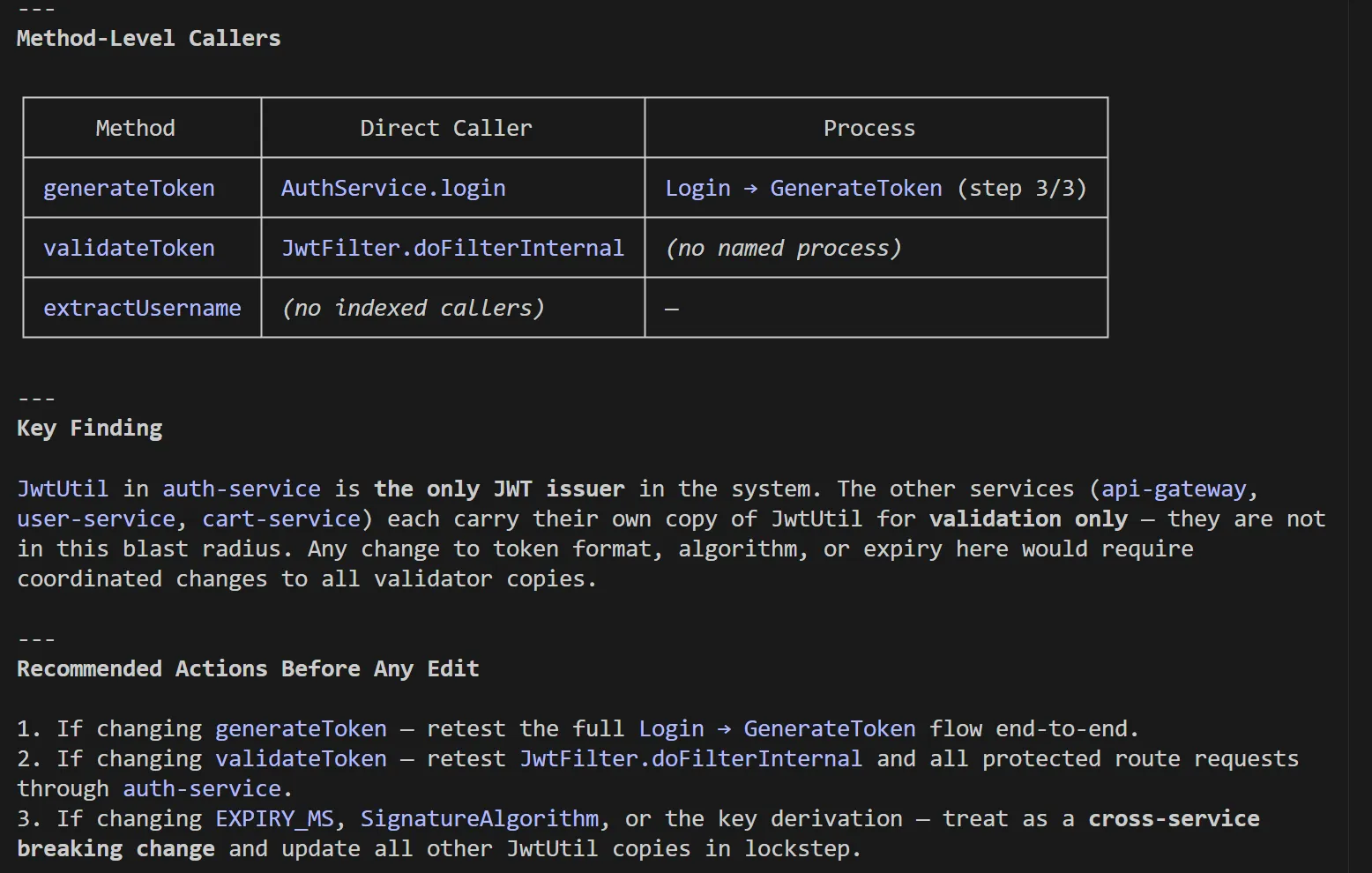
The rename tool is worth calling out separately. It combines graph-based lookup (high-confidence edits) with text search (lower-confidence edits needing manual review), and flags the difference in its dry-run output. You know exactly which edits the graph confirmed and which ones to verify before applying - useful transparency when a rename touches five files across two services.
Traditional Graph RAG vs Precomputed Relational Intelligence
The alternative is traditional Graph RAG: give the LLM access to the raw graph and let it issue multi-hop queries until it has enough context to answer. The failure modes are predictable.
An LLM exploring a call graph dynamically will issue a query, get a partial result, then stop. Either its context fills up, or it decides it has seen enough. Branches get missed. The result is confident but incomplete reasoning.
GitNexus precomputes the answers. By the time the agent calls impact({target: "UserService", direction: "upstream"}), the response is already there - all 8 callers, their confidence tiers, their cluster memberships, in one round trip. The agent cannot miss a dependency because there is no traversal to cut short. This also means smaller models work effectively, because the cognitive load of graph exploration has been shifted to the indexing phase.
The tradeoff is index freshness. A precomputed graph is only as accurate as the last time gitnexus analyze ran. GitNexus addresses this two ways. Claude Code hooks detect a stale index after commits and trigger a reindex. And detect_changes maps current git diffs to the existing graph without requiring a full update.
When to Use GitNexus (and When to Skip It)
Use it when:
-
Your codebase has more than a few hundred files and your AI agent is making breaking changes it should not. This is the primary signal. If agents are shipping blind edits on shared services, GitNexus gives them the structural context they are missing.
-
You are planning a major refactor - renaming a widely-used interface, changing a service contract, extracting a module. The
impacttool withdirection: "upstream"before you start is worth more than any code review after. -
You want to onboard new engineers (or agents) to unfamiliar parts of the codebase. The
contextandquerytools surface the architectural shape of a feature without requiring you to read every file. -
You are doing cross-repository impact analysis. The group commands (
gitnexus group sync,group contracts) build a contract bridge across repos - useful for microservice architectures where API shape changes in one service ripple into consumers in another.
Skip it when:
-
Your codebase is small enough that the agent’s context window can hold most of it. Below roughly 150–200 files, the overhead of maintaining an index probably exceeds the benefit.
-
You need real-time accuracy at commit-level granularity without any tolerance for staleness. GitNexus requires a re-index after each meaningful change. For a CI pipeline where the index must be current on every PR, the indexing time becomes a variable you need to budget.
-
Your primary language is not well-supported yet. OCaml, for instance, is listed as enterprise-only. COBOL support is present but regex-based rather than Tree-sitter. If your stack is heavily in an unsupported language, the graph will have large gaps.
-
Your repository exceeds ~5,000 files and you are using the browser-based Web UI mode. The CLI + MCP path handles arbitrarily large repos via chunked processing and worker threads. The Web UI is limited by browser memory and is better suited for exploration and demos than daily agent use on large monorepos.
Tips for Getting the Best Out of It
Run gitnexus analyze --skills after your first index. This generates repo-specific skill files under .claude/skills/generated/ by detecting functional communities in your codebase and producing a SKILL.md for each. Your agent then knows which files, entry points, and cross-area connections exist in, say, your PaymentProcessing cluster before it touches a single file. This is particularly valuable for Claude Code where the skills system is deeply integrated.
Use --skip-embeddings for large repos on first index. Generating embeddings via Snowflake arctic-embed-xs is opt-in precisely because it is slow and resource-intensive on repos with tens of thousands of symbols. Get the structural graph working first. Add embeddings once you have validated the index is accurate for your codebase.
Set minConfidence deliberately in impact queries. The default returns all detected dependencies regardless of confidence. For pre-commit impact analysis, a threshold of 0.8 is a good starting point - it filters out the lower-confidence heuristic edges that may over-report blast radius. For exploratory architecture mapping, lower the threshold to surface the full dependency surface even where the resolution is uncertain.
Do not use the Web UI for day-to-day agent work. The Web UI’s graph visualisation (Sigma.js with WebGL rendering) is excellent for understanding a codebase’s architectural shape in one session. For ongoing agent integration, the CLI + MCP path is the right tool - it is persistent, handles repo registration centrally, and provides the hooks that keep the index fresh.
Pair it with gitnexus wiki for team documentation. The wiki generator reads the indexed graph structure and produces per-module documentation with cross-references. For architectures that have historically poor documentation, this is a fast path to a living wiki that updates as the code evolves. It requires an LLM API key (defaulting to gpt-4o-mini) and a --force flag for full regeneration.
Leverage repository groups for microservice architectures. If your system spans multiple repositories, gitnexus group create and group sync let you build a contract bridge that tracks API shape across service boundaries. The group_contracts resource shows you which services depend on which providers - and impact with repo: "@<groupName>" propagates blast radius across that boundary.
Closing Thoughts
GitNexus is addressing something most teams only notice after an agent ships a breaking change: AI agents have no structural model of the codebase they are editing. That gap is not obvious until the first 2am incident proves it. The pipeline is not a thin wrapper around grep. It is a genuine multi-phase static analysis engine - MRO resolution, community detection, hybrid search - actively replacing the legacy call-resolution approach for migrated languages.
For any team where AI agents are doing meaningful work on a codebase larger than a few hundred files, maintaining a GitNexus index is worth the overhead. Blast radius analysis, call graph navigation, cross-file type resolution - tooling that used to live inside enterprise IDE plugins - is now accessible to any agent that speaks MCP.
The honest limitations are index freshness and the requirement for full re-indexing on changes. Both are tractable engineering problems. The foundations are solid.
Evaluating whether to introduce this? Start with one repository. Run npx gitnexus analyze, connect it to Claude Code, and run impact against the function your team is most afraid to touch. What comes back is a structured breakdown of every upstream caller - cluster memberships, confidence tiers - assembled in seconds instead of hours.
The GitNexus repository is open source at github.com/abhigyanpatwari/GitNexus. Enterprise and self-hosted offerings with PR review automation, auto-reindexing, and multi-repo support are available at akonlabs.com.
Discussion
Reader comments
Loading comments…